Tampilkan postingan dengan label flipped classroom. Tampilkan semua postingan

Jumat, 03 April 2015

A New Visual on Flipped Learning

April 4, 2015
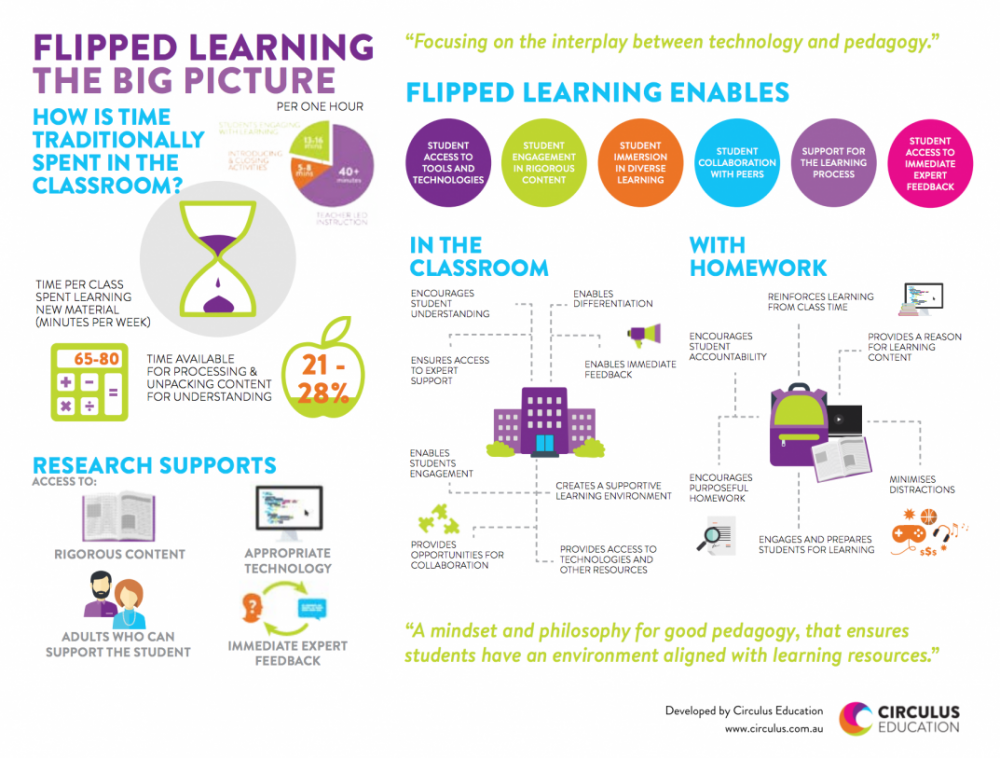
Here is another excellent graphic on flipped learning that we want to bring to your attention. As you see below, “Flipped Learning: The Big Picture” provides a visual illustration of the concept of flipped learning in terms of  what it has to offer to students learning both in class and at home. According to this graphic, flipped learning positively impact the learning that takes place in the classroom in the sense that it:Encourages student understanding, enables differentiation, ensures access to expert support, enables student engagement, creates a supportive learning environment, and provides opportunities for collaboration. Read on to learn more about how flipped learning supports students learning.
New Visual on Flipped Learning

 Follow us on : Twitter, Facebook , Google plus, Pinterest .
Read more

Rabu, 01 April 2015

The Flipped Learning Process Visually Explained

April 2, 2015
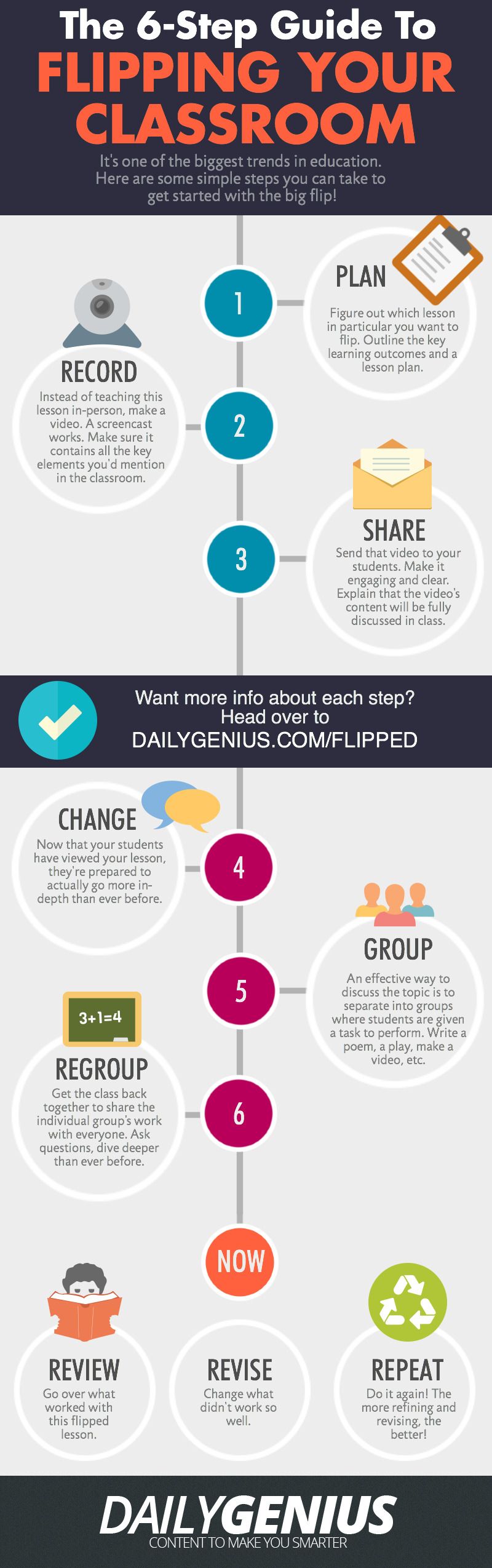
After yesterday’s post on “Flipped Learning Resources” one of our readers emailed us this beautiful visual outlining the six main steps involved in the creation of a flipped classroom. These steps include: planning, recording, sharing, changing, grouping, and regrouping. Read the graphic for more details on each of these steps.

As a refresher for those who are not yet familiar with the concept of a flipped classroom. Flipped learning or Flipped classroom or is a methodology, an approach to learning in which technology is employed to reverse the traditional role of classroom time. If in the past, classroom time is spent at lecturing to students , now in a flipped model, this time is utilized to encourage individualized learning and provide one-on-one help to students, and also to improve student-teacher interaction. While the instructional or teachable content is still available in class, however this content is mainly designed in such a way to be accessed outside class which is a great way for struggling students to learn at their own pace.

6 steps to flipp your classroom
via Daily Genius
Courtesy of eLearning Infographics

Read more

Selasa, 31 Maret 2015

Two Great Resources for Flipped Classrooms

April 1,  2015
Flipped classroom or flipped learning is a methodology, an approach to learning in which technology is employed to reverse the traditional role of classroom time. If in the past, classroom time is spent at lecturing to students , now in a flipped model, this time is utilized to encourage individualized learning and provide one-on-one help to students, and also to improve student-teacher interaction. While the instructional or teachable content is still available in class, however this content is mainly designed in such a way to be accessed outside class which is a great way for struggling students to learn at their own pace.

Here are two great resources packed full of tools and app to help you flip your classroom:


This is a list curated by technology coordinator Cassie Holewinski.


This one is curated by education researcher Meghan Arthur.
Read more

Senin, 02 Februari 2015

Teacher-tested Tools for Flipped Classroom

February 3, 2015
Whether you are just dipping your toe in flipped classroom instruction or have been carrying it out already, the right tools can make a big difference. Here are a set of teacher-tested tools that may help. 


Bibblio 
 A vast resource of educational content of all formats, organized visually.
eduCanon 
Turn videos on YouTube, Vimeo, or TeacherTube into interactive quizzes.
 Or add images, text, discussions, and quizzes to videos for interactive lessons.
 A Community of Practice is for sharing best practices in flipped classroom instruction.


Want more? Check out these collections of tools.

Flipped Classroom Tools 
This is curated by pre-service teacher Alicia Leonard.
This one is curated by professional development coordinator Marcia Kish.
Read more

Kamis, 29 Januari 2015

A Great Overview of The Flipped Classroom

January 30, 2015
Looking for a short insightful overview of the Flipped Classroom concept? Dr Jackie Gerstein has this wonderful video clip where she explains the essence of flipped classroom. The video is very short, a little over 2 minutes but it really does the job. For those of you looking for more resources and guides on how to integrate this flipped learning paradigm into their instruction, this section has tons of materials to browse through.


I am also sharing with you this chart I created last month comparing some major tools to use for a flipped classroom. You can check the Google Doc version of this chart from this link.


Read more

Selasa, 27 Januari 2015

This Is How to Create Flipped Videos by Adding Interactive Elements and Annotations to YouTube Clips

January 27, 2015
In an earlier post covering the best YouTube resources for teachers I argued that the educational potential of YouTube resides in it being both a free platform that provides a wide variety of educational videos to use in class and also in the powerful editing features it offers to video creators. In today’s post, I am sharing with you one of YuTube’s useful editing feature that allows you to add interactivity to your videos.

Using the interactivity feature, teachers will be able to add interactive elements to their videos to boost students engagement with the  content of their videos. These interactive features can be annotations, links to other videos or external resources on the web, call-for action buttons and many more. James Sanders has this excellent video tutorial in which he explains in a step by step process how to upload your video to YouTube and add different interactive features to it. I invite you to watch and share it with your colleagues. Enjoy.


Read more

Senin, 22 Desember 2014

A Handy Chart Comparing 5 Good Web Tools to Flip your Classroom

December 22, 2014
If you are looking for good web tools to create video lessons or platforms to help you flip your classroom , the tools below are probably what you need. These are the tools I have already covered in separate posts here in Educational Technology and Mobile Learning. I invite you to check them out and share with your colleagues.
You can access this chart on Google Docs using this LINK.


     Follow us on : Twitter, Facebook , Google plus, Pinterest .
Read more

Rabu, 03 Desember 2014

A Great Chart Explaining The Flipped Classroom Concept

December 3, 2014
Flipped classroom or flipped learning is a methodology, an approach to learning in which technology is employed to reverse the traditional role of classroom time. If in the past, classroom time is spent at lecturing to students , now in a flipped model, this time is utilized to encourage individualized learning and provide one-on-one help to students, and also to improve student-teacher interaction. While the instructional or teachable content is still available in class, however this content is mainly designed in such a way to be accessed outside class which is a great way for struggling students to learn at their own pace.

  Together with the resources I have been sharing with you on Flipped learning, the resource I have for you today is especially helpful in that it provides a very simple step by step explanation of flipped learning works. This chart is created and shared by the Blended Learning wiki. The page also provides some very good video tutorials on flipped classroom. I invite you to check out those resources and share with us what you think of them. Enjoy.

Check out the original chart HERE.


Read more

Rabu, 26 November 2014

Flipping The Classroom Using Blendspace

November 26, 2014
Blendspace is an excellent free tool to create flipped lessons for your class. You can create a class on Blendspace and invite up to 35 students to join it. The maximum number of active lessons you can have for free is 100. Besides sharing lessons with the class, you can also use it to collect web sources in a single place that you can share with students with just one link.


Blendspace offers built-in quiz functionality that allows you to create quizzes to test your students' comprehension. It also allows you to monitor student progress and adapt to students needs in real-time. Below is a set of video tutorials to help you learn more about how to use Blendspace and the different ways to use it in class:

1- Flipping the classroom using Blendspace


2- Digital Storytelling on Blendspace


3- Creating collaborative research presentations


 Follow us on : Twitter, Facebook , Google plus, Pinterest .
Read more